
- Why Default Router Firewalls Fall Short
- What a Business-Grade Firewall Actually Does
- Hardware vs. Software Firewalls: Which Do You Need?
- Common Mistakes Small Businesses Make
- What to Look for When Choosing a Firewall
- When to Bring in Professional Help
- Frequently Asked Questions
Your router came with a firewall. It was on when you plugged it in, and you've probably never touched it. That's the problem.
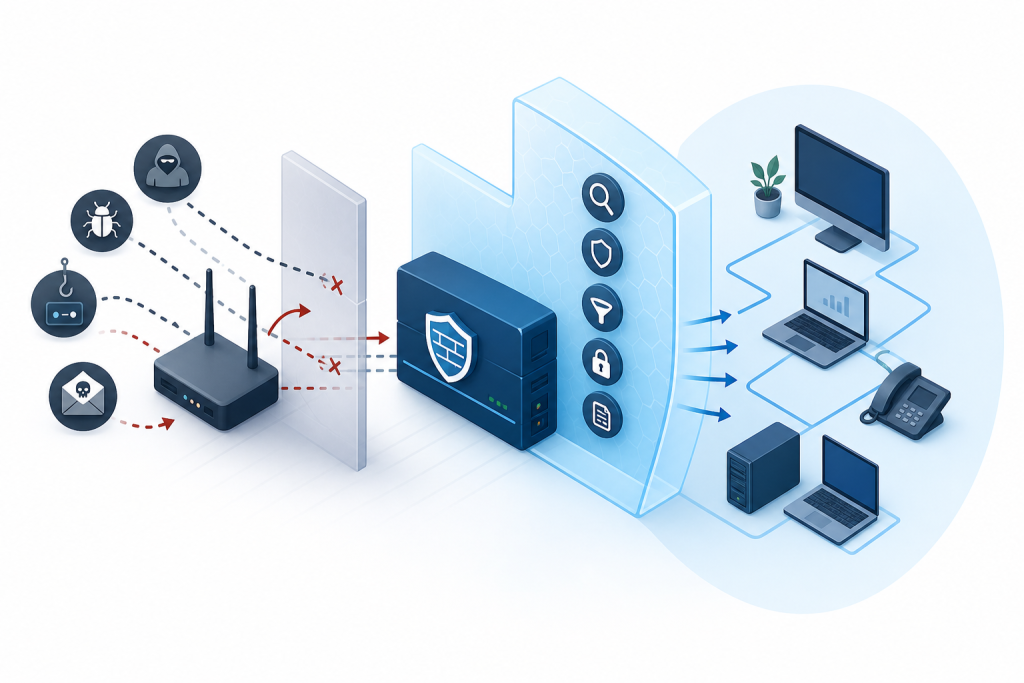
The default firewall built into a consumer or entry-level business router does one thing: block unsolicited incoming traffic. It handles that reasonably well. But it was never designed to stop an employee from clicking a phishing link, catch malware that's already inside your network, or give you any real visibility into what's happening on your systems. For a home network, that's acceptable. For a business handling customer data, financial records, or operational systems, it isn't.
Here's what a real firewall for small business actually looks like, why the defaults fall short, and what layers of protection you need in place.
Why Default Router Firewalls Fall Short
Most routers ship with stateful packet inspection (SPI) enabled. The router tracks active connections and blocks traffic that doesn't match a known, established session — a basic but legitimate form of protection.
The problem is everything it doesn't do.
Default router firewalls have no application awareness. They can't distinguish between legitimate web traffic and a command-and-control connection running over port 80. They don't inspect encrypted traffic. There's no intrusion detection, no useful threat logging, and firmware updates tend to stop once the manufacturer moves on to a newer model.
Attackers know this. Small businesses get targeted precisely because their defenses are predictable and thin.
What a Business-Grade Firewall Actually Does
A proper firewall for small business goes several layers deeper than packet filtering. Here's what that looks like in practice.
Deep Packet Inspection
Rather than just checking where traffic is coming from and going to, deep packet inspection (DPI) examines the content of the packets themselves. This allows the firewall to identify malicious payloads, block specific application types, and catch threats disguised as normal traffic.
Intrusion Detection and Prevention
An intrusion detection system (IDS) monitors your network for patterns that match known attack signatures. An intrusion prevention system (IPS) takes it further by actively blocking those threats in real time. Business-grade firewalls typically include both — often referred to together as IDPS.
Application-Layer Control
Application awareness lets your firewall enforce rules at the software level. You can block file-sharing applications, restrict social media during work hours, or filter out entire categories of websites. That's useful for both security and keeping productivity on track.
VPN Support
If your team works remotely or across multiple locations, your firewall should support site-to-site and remote access VPN connections. This encrypts traffic between endpoints and your network instead of leaving employees to connect through whatever Wi-Fi they happen to be near.
Logging and Alerting
A firewall you can't see is a firewall you can't trust. Business-grade solutions provide detailed logs, traffic reports, and real-time alerts when something unusual happens. That visibility matters when you're investigating a breach or trying to demonstrate compliance.
Hardware vs. Software Firewalls: Which Do You Need?
Both — and they serve different purposes.
A hardware firewall sits at the perimeter of your network, between your internet connection and your internal systems, filtering traffic before it ever reaches your devices. This is your first line of defense and should be a dedicated appliance, not a function bundled into a cheap router.
A software firewall runs on individual devices. Windows and macOS both include built-in options, but endpoint security software typically goes further, catching threats that originate from inside the network or arrive through email and downloads rather than inbound network traffic.
For most small businesses, the right setup is a dedicated hardware firewall at the network edge combined with endpoint protection on every machine. Neither one replaces the other.
Common Mistakes Small Businesses Make
Using consumer-grade hardware. Routers marketed to home users aren't built for business environments. They lack the processing power, update cadence, and feature sets that business networks require.
Never updating firmware. Firewall hardware and software need regular updates. Unpatched vulnerabilities in network equipment are a well-documented attack vector, and falling behind means losing ground steadily over time.
Flat network architecture. Many small businesses run everything on a single network segment — servers, employee workstations, guest Wi-Fi, and point-of-sale systems all sharing the same space. Proper segmentation using VLANs limits how far an attacker can move once they're in.
No monitoring. A firewall that logs threats nobody reviews is only marginally better than no firewall at all. Monitoring and response matter as much as the hardware itself.
Assuming the firewall covers everything. Firewalls are one layer of a broader security posture. They don't replace strong passwords, multi-factor authentication, employee training, or regular backups. Security works in layers, and a gap in any one of them can be enough for an attacker to exploit.
What to Look for When Choosing a Firewall
When evaluating options, these are the capabilities worth prioritizing for a small business environment:
- Throughput capacity that matches your actual internet speed and traffic volume
- Automatic updates so threat definitions and firmware stay current without manual intervention
- Centralized management if you have multiple locations or a managed IT provider handling your network
- SSL/TLS inspection to examine encrypted traffic, which now accounts for the majority of web activity
- Support contract so you have someone to call when something goes wrong
The specific brand matters less than whether the device is actively supported, properly configured, and monitored by someone who knows what they're looking at.
When to Bring in Professional Help
Configuring a business-grade firewall correctly isn't a set-it-and-forget-it task. Rules need to be tuned, exceptions need to be managed, and the threat landscape shifts constantly. Most small business owners don't have the time or background to do this well — and a misconfigured firewall can create a false sense of security that's worse than knowing you have gaps.
If your current setup is a router from your ISP and nothing else, that's a clear signal it's time for a network audit. Epuerto handles network security, firewall management, and IT infrastructure for small businesses that need done-for-you support rather than a stack of tools to figure out on their own.
Getting the right firewall in place is the starting point. Keeping it configured, updated, and monitored is the ongoing work that actually keeps your business protected.
Frequently Asked Questions
Does my router's built-in firewall protect my business?
It provides basic protection against unsolicited inbound traffic, but it lacks application awareness, intrusion detection, encrypted traffic inspection, and meaningful logging. For a business environment, it's not sufficient on its own.
What's the difference between a hardware firewall and a software firewall?
A hardware firewall sits at your network perimeter and filters traffic before it reaches your devices. A software firewall runs on individual machines and protects against threats that originate locally or arrive through email and downloads. Most businesses need both.
How often should a business firewall be updated?
Firmware and threat definition updates should be applied as soon as they're available — typically at least monthly. Many business-grade firewalls can be configured to update automatically, which reduces the risk of falling behind.
What is network segmentation and why does it matter?
Network segmentation divides your network into separate zones so a compromise in one area doesn't automatically give an attacker access to everything else. Keeping your point-of-sale systems on a separate segment from your general office network, for example, limits the blast radius of a breach.
Can a firewall stop phishing attacks?
A firewall with DNS filtering and web content controls can block access to known malicious domains, which reduces the risk. But it won't catch every phishing attempt — especially those that arrive via email or use newly registered domains. Employee awareness training and dedicated email security tools are also necessary.
Do I need a firewall if I use cloud-based software?
Yes. Cloud software doesn't eliminate the need to protect your local network, endpoints, or the connections between them. Attackers can still target your devices, intercept traffic, or use your network as a foothold to reach other systems.
How do I know if my current firewall is adequate?
A network security audit is the most reliable way to find out. This involves reviewing your current hardware, configuration, logging practices, and overall network architecture against current threat standards. If you haven't had one done recently, it's worth scheduling.
Your default router settings were never meant to carry the weight of a business network. A proper firewall — correctly configured and actively managed — is one of the most direct investments you can make in protecting your operations, your data, and your customers. If you're not sure where your current setup stands, Epuerto can help you assess it and build something that actually holds up.