
- What Multi-Factor Authentication Actually Is
- Why Small Businesses Are the Primary Target
- Types of MFA Methods
- How to Set Up MFA for Your Business
- MFA and Managed IT: Where It Fits
- What MFA Costs
- Common Mistakes to Avoid
- Frequently Asked Questions
- The Bottom Line
Multi-factor authentication for business is one of the most direct ways a small company can stop being a soft target. If your team logs into email, accounting software, or a remote desktop with just a username and password, a stolen credential is all an attacker needs. Adding a second or third verification step changes that equation entirely.
This guide covers what MFA is, how it works in a business context, the main types available, how to roll it out without disrupting your team, and what you should expect to spend.
What Multi-Factor Authentication Actually Is
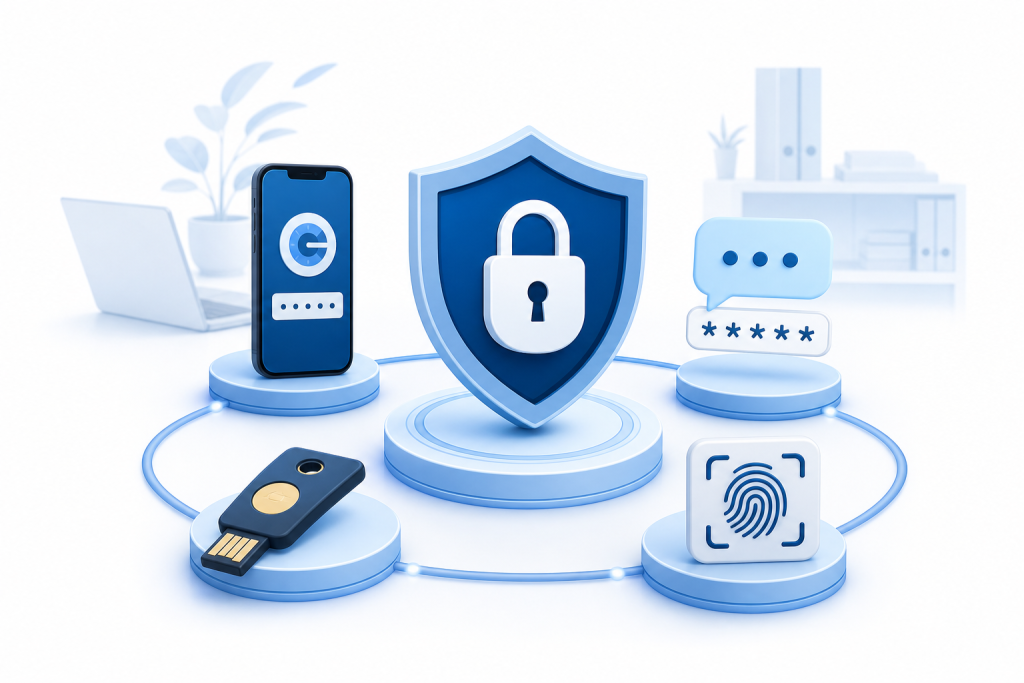
Authentication factors fall into three categories: something you know (a password), something you have (a phone or hardware token), and something you are (a fingerprint or face scan). Multi-factor authentication requires at least two of those categories before granting access.
Two-factor authentication, or 2FA, is the most common implementation — a password combined with a one-time code sent to a phone or generated by an app. Full MFA can layer in biometrics or hardware keys on top of that.
The practical effect is simple. Even if a password is leaked in a data breach or handed over in a phishing attack, the attacker still cannot get in without the second factor sitting in your employee's pocket.
Why Small Businesses Are the Primary Target
Large enterprises have dedicated security teams. Small businesses often have no one watching the door at all. That asymmetry makes smaller organizations attractive targets — not because the payoff per attack is larger, but because the resistance is lower.
The most common entry points are email accounts, remote desktop connections, and cloud applications like QuickBooks, Microsoft 365, or Google Workspace. All of these support MFA natively. Most small businesses never turn it on.
A single compromised email account can expose customer data, financial records, and internal communications. For a business with 5 to 15 employees and no IT staff, recovering from that kind of breach is expensive in both time and money.
Types of MFA Methods
Authenticator Apps
Apps like Google Authenticator, Microsoft Authenticator, and Authy generate a time-based one-time code that refreshes every 30 seconds. The code lives on the employee's phone and never travels over SMS, which makes it more resistant to SIM-swapping attacks. This is the method most IT professionals recommend as the baseline for business accounts.
SMS and Email Codes
A one-time code sent by text or email is better than a password alone, but it is the weakest MFA option. SMS codes can be intercepted through SIM-swapping or carrier-level attacks. For low-risk internal tools it may be acceptable, but for email, banking, or remote access, an authenticator app or hardware key is a stronger choice.
Hardware Security Keys
Physical keys like YubiKey plug into a USB port or tap against a phone via NFC to confirm identity. They are the most phishing-resistant option available because the key cryptographically verifies the site you are logging into, not just the account. Hardware keys are common in healthcare and financial services where the cost of a breach is highest.
Biometric Authentication
Fingerprint readers and face recognition are increasingly built into laptops and phones. When combined with a password, they satisfy the MFA requirement and require no extra device. Windows Hello and Apple Face ID both qualify. For a small business already issuing modern laptops, this is a low-friction option worth considering.
How to Set Up MFA for Your Business
Start With the Accounts That Matter Most
Not every system needs MFA on day one. Prioritize in this order: email accounts, remote access tools (VPN, RDP), cloud storage, financial software, and your website's admin panel. These are the accounts where a breach does the most damage.
Choose a Consistent Method Across Your Team
Mixing methods creates confusion and support headaches. Pick one authenticator app, make it the standard, and document the setup process in plain language so employees can follow it without calling for help.
Enroll Employees Before Enforcing the Policy
If your platform supports it, turn on MFA in report-only mode first. This lets you see who has enrolled and who has not before you flip the switch that blocks unenrolled users. Forcing MFA without a grace period creates lockouts on a Monday morning.
Plan for Lost Devices
Every MFA deployment needs a recovery process. If an employee loses their phone, how do they get back in? Options include backup codes stored securely, a secondary device, or an IT-managed recovery workflow. Define this before someone needs it at 7 a.m.
Test Before You Go Live
Log in as a test user from a fresh browser session and confirm the full MFA flow works. Check that recovery codes are accessible and that the help desk process is documented. A five-minute test prevents a two-hour outage.
MFA and Managed IT: Where It Fits
For a small business without a dedicated IT person, the challenge is not understanding MFA conceptually. It is having someone who will actually configure it correctly, enforce the policy across every account, and handle the edge cases when something breaks.
That is where managed IT support adds the most value. A provider handling your endpoint security, patch management, and firewall can also enforce MFA policies across your Microsoft 365 or Google Workspace tenant, monitor for failed login attempts, and respond when an account shows signs of compromise.
If you are already paying for managed IT services, MFA enforcement should be part of that scope — not an add-on conversation. If it is not being discussed, ask about it directly.
Epuerto handles cybersecurity as part of its managed IT engagements for small businesses in Coos Bay and Coos County, covering endpoint detection, patch management, encrypted email, and employee security training alongside network and infrastructure work. For a business owner who does not want to manage any of this internally, that kind of bundled coverage is worth asking about.
What MFA Costs
Costs vary depending on the method and whether MFA is bundled into software you already pay for.
Authenticator apps are free. Google Authenticator and Microsoft Authenticator cost nothing to download and use. If your team is already on Microsoft 365 or Google Workspace, MFA via authenticator app is included at no additional charge.
Hardware security keys run roughly 25 to 60 dollars per key depending on the model and connector type. For a team of ten, that is a one-time cost of 250 to 600 dollars. Keys last for years and require no subscriptions.
Identity and access management platforms like Okta, Duo, or Microsoft Entra ID (formerly Azure AD) add centralized MFA management, single sign-on, and policy enforcement across all your business apps. Pricing for these platforms is per user per month and varies by tier. For a small business already on Microsoft 365 Business Premium, much of this functionality is already included in the license.
Managed IT with MFA enforcement is priced as part of a broader service engagement rather than as a line item. If you are evaluating a managed IT provider, ask specifically whether MFA policy enforcement, conditional access configuration, and breach monitoring are included in the scope.
The honest answer on cost is that the tools are often free or already paid for. The real cost is the time to configure everything correctly, train your team, and maintain the policy as people join and leave. That is the part most small businesses skip, and it is exactly where a managed IT provider earns its fee.
Common Mistakes to Avoid
Enabling MFA only on some accounts. An attacker who cannot get into your email will try your accounting software next. Coverage needs to be consistent.
Using SMS as the only option. It is better than nothing, but if you are going to the effort of rolling out MFA, use an authenticator app.
No offboarding process. When an employee leaves, their MFA enrollment needs to be removed immediately. An ex-employee with active credentials and a registered authenticator device is a real risk.
Skipping training. Employees who do not understand why MFA exists will find workarounds or disable it when they can. A short explanation of what it protects against takes ten minutes and prevents a lot of friction down the road.
No recovery plan. Lockouts happen. Have a documented process before you need it.
Frequently Asked Questions
What is multi-factor authentication for business and how does it differ from two-factor authentication?
Multi-factor authentication requires two or more verification factors from different categories: something you know, something you have, or something you are. Two-factor authentication is the most common form of MFA, using exactly two factors. In practice, most businesses start with 2FA and call it MFA, which is accurate as long as the two factors come from different categories.
Does MFA actually stop cyberattacks?
MFA is highly effective against credential-based attacks, which are among the most common entry points for breaches. It does not protect against every attack type, but it eliminates the risk that a stolen or guessed password alone is enough to access your systems.
Which MFA method is best for a small business?
An authenticator app is the best starting point for most small businesses. It is free, works with nearly every major platform, and is significantly more secure than SMS codes. Hardware security keys are the strongest option for high-risk accounts or regulated industries.
Can MFA lock employees out of their accounts?
Yes, if a device is lost or the setup is not done correctly. This is why a recovery process and backup codes are essential before you enforce MFA across your team. A managed IT provider can set this up in a way that minimizes lockout risk.
Is MFA required for HIPAA or other compliance frameworks?
HIPAA does not mandate MFA by name, but it does require access controls and audit controls that MFA directly supports. Many cyber insurance policies now require MFA as a condition of coverage. If your business handles health information or carries cyber insurance, MFA is effectively required.
How long does it take to roll out MFA for a small business?
For a team of five to fifteen people using Microsoft 365 or Google Workspace, a basic MFA rollout can be completed in a day or two. That includes configuring the policy, enrolling users, and documenting the recovery process. A more comprehensive rollout covering all business applications and training takes longer.
Do I need a separate tool to manage MFA, or is it built into the software I already use?
Most major platforms — including Microsoft 365, Google Workspace, QuickBooks Online, and Salesforce — have MFA built in at no extra cost. You may not need a separate identity management tool unless you want centralized policy enforcement across many applications, which is where platforms like Microsoft Entra ID or Duo become useful.
The Bottom Line
Multi-factor authentication for business is not a complex project. The tools are available, most of them are free, and the setup is straightforward for anyone who has done it before. The gap for most small businesses is not awareness — it is execution.
If your team is still logging in with passwords alone, that is the most direct security risk you can close this week. Start with email and remote access, use an authenticator app, build a recovery process, and enforce the policy consistently.
If you would rather have someone handle the configuration, monitoring, and ongoing enforcement without pulling your attention away from running the business, that is exactly the kind of work a managed IT provider should be doing for you.